The Best AI Stem Separation and Vocal Removal Tools in 2026

Founder & CEO, Futureproof Music School
Last updated August 2026. Next review: September 2026.
Ask ten producers to name the best AI stem separation tool and four answers keep repeating: Ultimate Vocal Remover for the best possible quality at zero cost, MVSEP for that quality in a browser, Logic Pro’s Stem Splitter for the best one living inside a DAW, and Moises for the app with no learning curve.
One warning before the list: this space moves fast. Advice from 2023 or 2024 about Spleeter or early Demucs is actively wrong now. A newer generation of models (the Roformer family) beat everything before it, which is also why some big-name paid tools now lose to free ones.
The rankings
Best quality, free: Ultimate Vocal Remover (UVR5)
Nothing you can pay for reliably beats it; the trade is setup time and a rough interface.
Best in a browser: MVSEP
The newest models land here first, and the free tier covers 50 separations a day.
Best inside a DAW: Logic Pro Stem Splitter
The community’s standing estimate is 85 to 90 percent of UVR’s quality, from a right-click.
Easiest full app: Moises
Stems, chords, BPM, and practice tools on your phone, with the best drum sub-separation anywhere.
Surgical extraction and repair: SpectraLayers
When you need one specific instrument out of a mix, hand-editing the spectrogram is the only real answer.
For DJs: prepare stems ahead
Real-time booth separation is convenient and audibly worse; pre-split your tracks instead.
Full analysis and a price comparison below.
How we researched this
We read everything we could find on the internet about these tools (community threads, head-to-head videos, and the comment sections under them) and aggregated it, weighted toward the last twelve months. Prices come from vendor pages as of August 2026, in US dollars, where vendors publish them; two gate pricing behind a login, and we say so. We also check who sponsors each comparison, because sponsors win their own shootouts with suspicious consistency.
Two truths that survived every comparison
Bass is every tool’s weakest stem. Independent tests keep finding the same thing: extracted bass comes back low-passed, missing its upper harmonics and transient snap. Experienced producers treat the bass stem as a reference and replay the part.
Denser mixes separate worse. A sparse 1970s recording can split almost perfectly while a modern, heavily limited master full of layered synths falls apart. Low-bitrate MP3s and AI-generated songs are the worst case. Start from the best source you can get.
The tools, one by one
Ultimate Vocal Remover (UVR5)
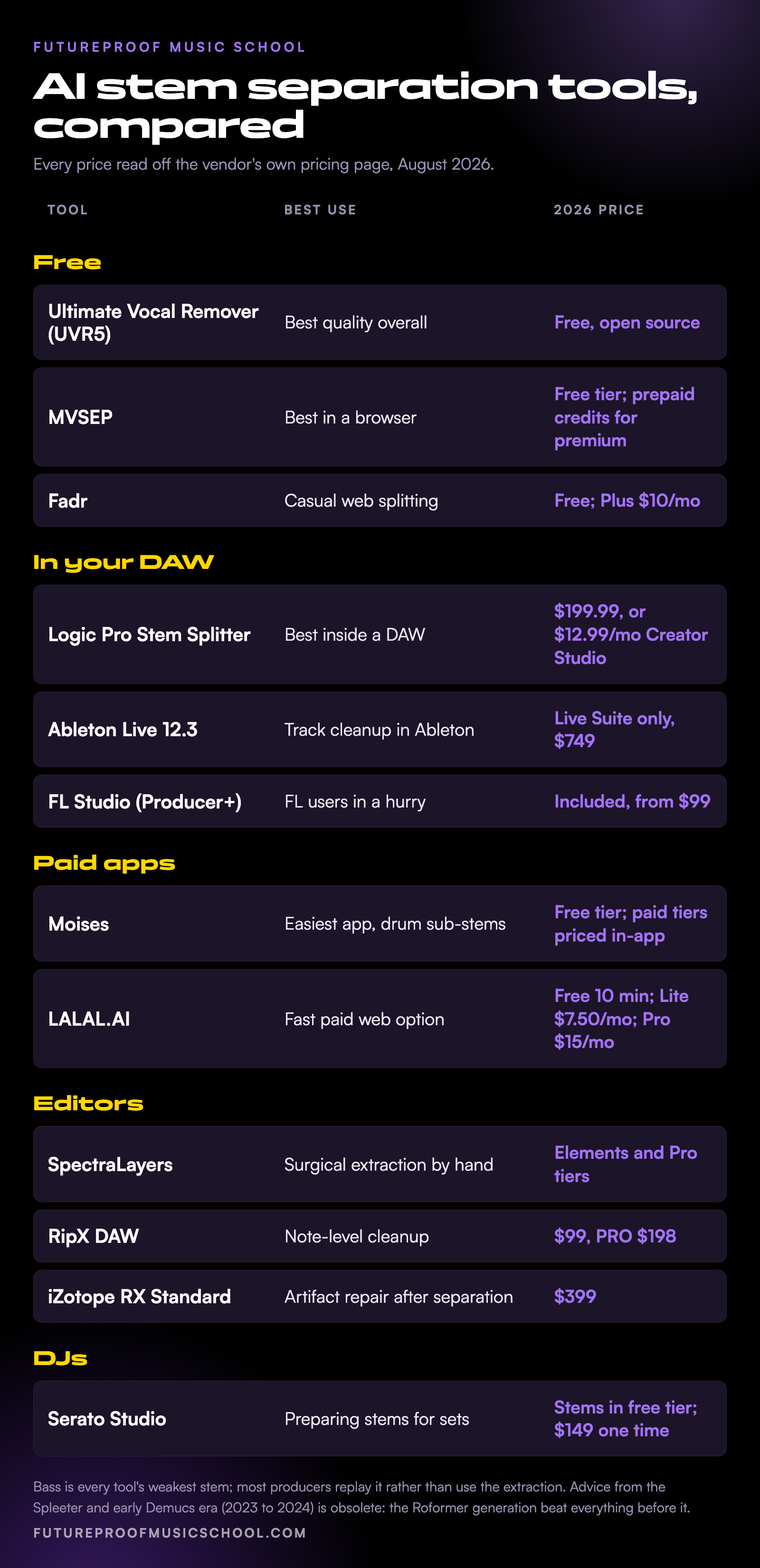
If you read one recommendation, this is it. UVR is free, open source, and runs locally on Windows, Mac, and Linux, which also means it works offline and nothing gets uploaded anywhere. Across every community we checked it is the default answer for maximum quality, and one reviewer reported playing a UVR extraction for producer friends who assumed it was the official studio acapella.
The catch: out of the box it is not the good version of itself. The quality lives in the newer Roformer models (via the 5.6 beta) and in community-favorite models like Kim’s Vocal 2 for lead vocals, and its ensemble mode, which runs several models and averages out their artifacts, is what produces the jaw-dropping results. That means an hour of setup and model-picking before it sings, and it is slow without a decent GPU. If that sounds like more hobby than you want, the rest of this list exists for you.
Best for: the best separation available at any price. Price: free.
MVSEP
MVSEP is the enthusiast pick: it hosts the newest open models first, and it runs the public quality leaderboards the community treats as the reference scoreboard. When in doubt about which model to use, sort by the leaderboard and take the current leader. The free tier is genuinely useful: up to 50 separations a day, MP3 output with no account, WAV or FLAC if you register.
Premium works on prepaid credits rather than a subscription and unlocks ensemble processing and bigger files. The site looks homemade and support is thin, which is part of the deal with an enthusiast-run service.
Best for: UVR-class quality with nothing installed. Price: free tier; inexpensive prepaid credits for premium.
Logic Pro Stem Splitter
The surprise of the last year. It launched as merely okay, then a 2025 update transformed it, and the most-quoted community framing is that it reaches 85 to 90 percent of UVR’s quality, except stems pop out five seconds after a right-click. It splits vocals, drums, bass, guitar, and piano locally on Apple Silicon, with everything else landing in an “other” stem.
Real uses people report: removing guitar bleed from a vocal mic, cleaning drum bleed out of band-practice recordings. More than a few Ableton users admit they open Logic just to split stems, then bring the files back.
Best for: the best separation inside any DAW. Price: included with Logic Pro, $199.99 one time or via Apple’s Creator Studio subscription at $12.99 a month.
Ableton Live 12.3
Ableton shipped stem separation in Live 12.3, and its launch thread is the most evenly split argument in this whole category: “best I have heard” and “disappointing, sticking with UVR” sit side by side with similar votes. In a blind test posted to the Ableton subreddit with audio files, most listeners preferred its high-quality mode over SpectraLayers on bass and drums, which is a strong showing.
Both camps agree it shines for cleanup on individual tracks, like stripping bleed from a take, and both still rank Logic’s splitter ahead of it. It is Suite-only: Intro and Standard do not include it. FL Studio users have a rough equivalent built into Producer Edition and up, though it wins no fans and struggles on compressed sources.
Best for: track cleanup without leaving Ableton. Price: included in Live Suite, $749.
Moises
Moises is what you hand someone who wants results without reading anything. Upload a song on your phone or in a browser and you get stems plus chords, BPM, key, and practice tools. Two things it does better than nearly everyone: background vocal separation, which most tools do not even offer, and drum sub-separation, splitting a kit into kick, snare, hats, and toms.
The honest split from the tests: the biggest independent comparison crowned it the best easy option, while a 2026 head-to-head found its lead-vocal separations trailing the newest models. Both can be true. It is the best all-in-one experience and no longer the outright quality leader.
Best for: practice, remix sketching, and phone workflows. Price: free tier; current paid prices are shown in the app behind a login.
LALAL.AI
No tool divides producers like this one. In sponsored comparisons LALAL wins; in unsponsored ones it finishes mid-pack, and the one test with the original studio stems for reference caught it dropping an entire synth line. It also does real things well: punchy drum stems with cymbals intact, and strong lead-versus-background vocal separation.
The sharper problem is value, and the community says it openly: the free Roformer-based tools match or beat it. It has defenders who insist it currently beats everything, and cancellation threads are easy to find. Decide which camp you are in before subscribing.
Best for: fast paid web separation with a slick interface. Price: free 10 minutes; Lite $7.50 a month; Pro $15 a month.
SpectraLayers and RipX
These two are editors first, separators second. SpectraLayers’ trick is that separation is the start, not the end: its transfer tool moves pieces of the spectrogram between layers by hand when the algorithm gets something wrong, and Unmix User-Defined trains the separation on a section of the track itself, which is the only real answer anyone offers for “extract this specific organ part.”
RipX turns audio into editable note blobs you can repitch, move between stems, or delete one note at a time. Its one-click separations now rate as mid, so the consensus use is surgical cleanup after separating elsewhere. iZotope RX Standard ($399) belongs in this group too: producers now recommend it for repairing artifacts after separation rather than for separating.
Best for: extracting or fixing one specific part. Price: SpectraLayers in Elements and Pro tiers, frequently discounted; RipX $99, PRO $198.
The free web tier
For casual, occasional jobs the free browser tools are fine and roughly interchangeable. Fadr stands out: free separation with MP3 downloads and MIDI detection, with a $10-a-month Plus tier for WAV files. Demucs, the open Meta model that used to lead the field, is in maintenance mode but still fast and decent through wrappers. AudioShake sits at the other extreme: the professional-licensing tier labels use for official instrumentals and film work, no public pricing.
Best for: trying separation on your own track in the next five minutes. Price: free.
For DJs
Real-time DJ stems are their own conversation, and the verdict is consistent: convenient in the booth, audibly worse than prepared stems on a big system. Rekordbox catches the most criticism, Traktor and VirtualDJ the most praise, Serato in between. The pro move that keeps appearing in DJ threads: prepare stems ahead with a Roformer-based tool (Nuo Stems, a prep service built for exactly this, comes up constantly alongside UVR and MVSEP) and load those instead. Serato Studio includes stems even in its free tier.
How to remove vocals cleanly
Vocal removal is stem separation run in reverse: separate the vocal, keep the rest. The tricks that came straight from the threads:
- Start from a lossless file. Every tool degrades on low-bitrate rips and heavily limited masters.
- Use a current model. UVR’s newer models or MVSEP’s leaderboard leader are the ceiling right now.
- Low-pass the result at 20 kHz before pitching or compressing it. Separation artifacts hide above the range you can hear, and processing drags them down into it. One brick-wall filter prevents that.
- Blend, don’t replace. Mixing the separated stem back with the original hides the watery artifacts that full replacement exposes.
- Expect to recreate bass. See the two truths above.
Should you pay at all?
The cost math no comparison page prints: if you separate a handful of songs a month, the free tiers of UVR, MVSEP, and Fadr cover you completely, and paying is irrational. Subscriptions make sense for convenience at volume, or for a specific capability: SpectraLayers’ hand editing, AudioShake’s licensing-clean stems for label work. The most common regret in the threads is a subscription bought for a one-week remix project.
Which tool should you pick?
- Best possible quality, will tolerate setup: UVR5 with the newer models. Free.
- That quality, nothing installed: MVSEP. Free tier first.
- You live in a DAW: Logic’s splitter on Apple Silicon; Ableton’s if you have Suite; either way UVR when a separation really matters.
- One app for practice, remixes, and phone use: Moises.
- Extracting one specific instrument: SpectraLayers, with RipX for note-level cleanup.
- You DJ: pre-split with a Roformer tool and load the stems; don’t trust real-time separation on a big system.
There are hard limits no tool crosses yet. Two similar instruments sharing a register (two distorted guitars, organ and guitar) will not come apart, orchestral music defeats everything, and the “other” stem is a dumping ground in every tool. The one comparison with the true studio stems for reference concluded that nothing on the market approaches original-stem quality. So use separation for what it is genuinely great at: acapellas, cleanup, practice stems, and DJ edits. Once you have rebuilt something from the stems, our free Mix Assistant will tell you whether the new mix holds together, our AI mixing and mastering guide covers the other half of the pipeline, and the free trial adds courses and live feedback around all of it. Try the rest of our free apps too.
Frequently Asked Questions
What is the best free AI stem separation tool?
Ultimate Vocal Remover (UVR5) for maximum quality if you will install it and pick models, MVSEP for comparable quality in a browser with no setup. Both are genuinely free rather than trial bait, and community consensus puts both ahead of most paid options. For quick casual jobs, Fadr’s free tier is fine.
What is the best vocal remover for making instrumentals?
The same tools that win at separation win at vocal removal, because it is the same job in reverse. UVR5 with a current vocal model produces instrumentals clean enough to pass for official versions. Start from a lossless file and low-pass the result at 20 kHz before further processing.
Is Logic’s Stem Splitter as good as dedicated tools?
Close, and the gap keeps shrinking. The community’s standing estimate is 85 to 90 percent of UVR’s quality at a fraction of the effort. For remix grabs and track cleanup it is usually enough; for a separation that has to be perfect, producers still reach for UVR or MVSEP.
Why does separated bass sound bad?
Bass is the weakest stem in every tool, confirmed by multiple independent tests. Extracted bass comes back low-passed and missing transient snap, because bass overlaps heavily with the kick and the models have the least information to work with down there. Most producers replay the part instead.
Can I legally release a remix made from separated stems?
Separating is easy; releasing is a rights question. You need permission from the rights holders of both the recording and the composition before distributing a remix, whatever tool made the stems. The details are in our guide to making a remix legally.
What changed in this update
August 2026: rebuilt to a rankings-first structure at half the length. No recommendation changes: UVR, MVSEP, Logic, and Moises hold their positions.
Liked this? Tell Google to show you more Futureproof.
John von Seggern
Founder & CEO, Futureproof Music School
John von Seggern is the founder and CEO of Futureproof Music School. He holds an MA in digital ethnomusicology (the anthropology of music on the internet) from UC Riverside, and a BA in Music, magna cum laude, from Carleton College. A techno producer and DJ since the late 1990s, he released as John von on his own net.label Xeriscape Records while working at Native Instruments, where he co-authored the MASSIVE synth manual. He contributed sound design to Pixar's WALL-E (2008), was a member of Jon Hassell's late-career Studio Group on Hassell's final two albums, ran Icon Collective's online program with Max Pote for eight years before Icon closed in May 2025, and authored three books on music technology including Laptop Music Power!. He architected Kadence, the AI music coach at the core of Futureproof.
Ready to level up your production?
Join Futureproof for live mentorship, AI coaching, and a community of producers.
Start your 14-day free trial