The Best Vibe Coding Tools for Music Producers in 2026

Founder & CEO, Futureproof Music School
Last updated August 2026. Next review: September 2026.
When I started doing this seriously a couple of years ago, there were maybe three AI coding tools worth using. Now there are dozens, and the marketing copy for all of them sounds about the same.
Here’s an honest take on which ones I’d actually hand to a music producer who’s never written code. I’ve used all of these. Some I reach for every day. A couple I bounce off of regularly. I’ll tell you which is which.
If you haven’t read the first piece in this series, start there. The short version: vibe coding is building your own software by describing what you want in plain English while an AI agent does the typing. This post is about which agent to actually use.
The rankings
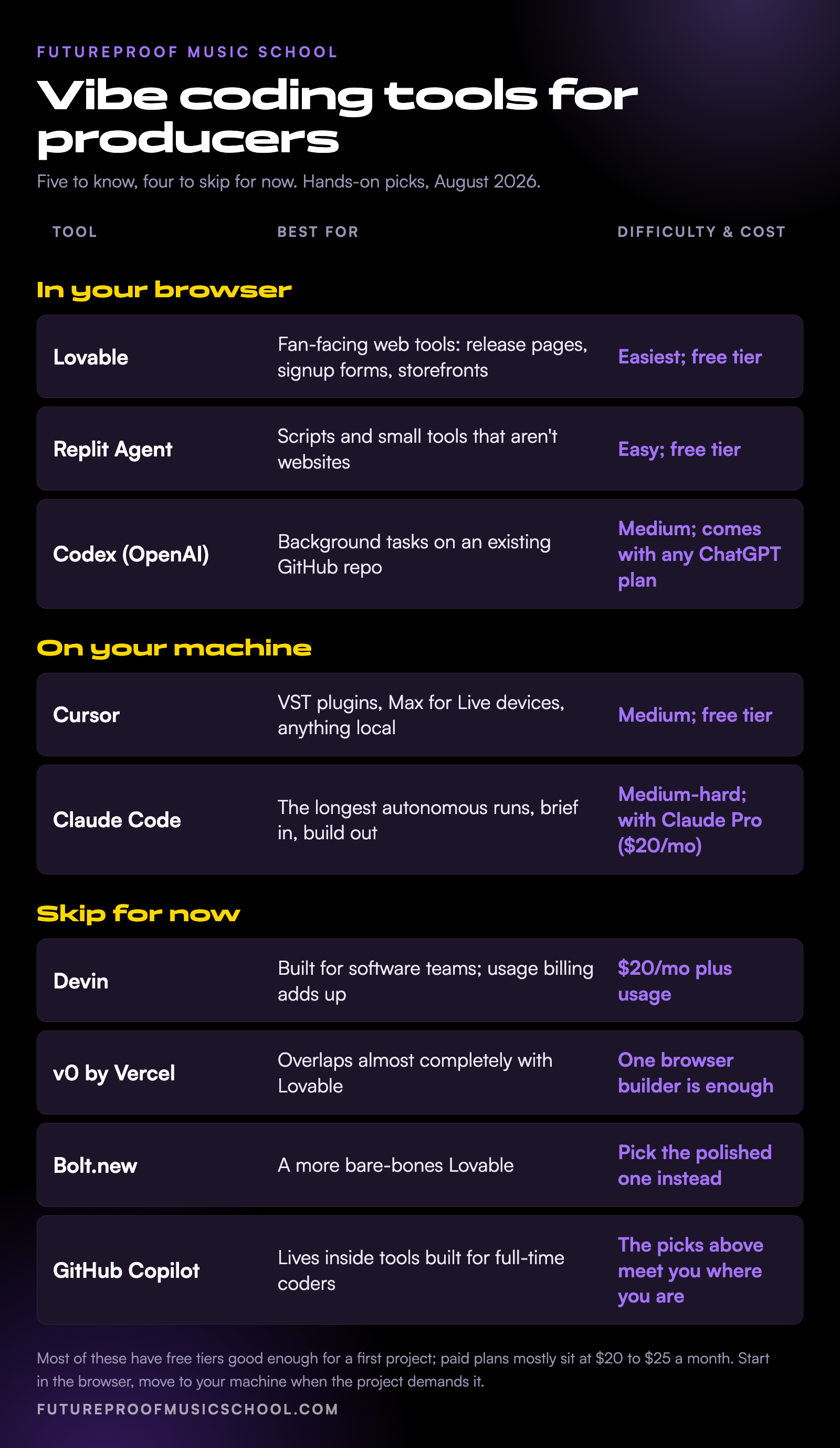
Easiest first project: Lovable
Type what you want in a browser tab and adjust until it looks right.
Scripts and small tools: Replit Agent
A real coding environment in the browser, for the useful little tools that aren’t websites.
Best for an existing project: Codex
Give it a job, close the tab, and review the finished work later.
Building on your machine: Cursor
The editor you graduate to when the project has to live on your laptop.
Best for hands-off building: Claude Code
Brief it like a session engineer, go make coffee, come back and review the take.
The pattern most producers end up following: start in the browser, move to your machine when the project demands it. All five are free to try or bundled with a subscription you may already have; paid plans mostly run $20 to $25 a month. Here’s the detail on each, plus a side-by-side.
The tools, one by one
Lovable
Lovable is what I’d hand to almost any producer for their first project. It’s a browser tab. You type what you want, it builds you a working website. Click around, see what’s wrong, type a correction, watch it fix itself. There’s no installation, no terminal, no concept of files. You just describe and adjust.
What it’s great at: fan-facing tools. A landing page for a release that actually embeds the music instead of linking out. An email signup form that doesn’t look like every other artist’s Linktree. A merch storefront. A direct-download delivery page for tracks you’re selling outside Spotify.
What it’s not great at: anything that has to live on your machine and run while your DAW is open. Lovable builds web apps, and a VST plugin is not a web app. Honestly, if you’re trying vibe coding for the first time, this is the lowest-friction way in.
Replit Agent
Replit is similar in spirit to Lovable but a step deeper. Still in the browser, but it gives you a real coding environment with terminals, files, and the ability to run scripts in Python or Node. The agent can do more inside that environment than Lovable can.
This is the right tool if you want to build something that isn’t a website. A sample organizer script that walks a folder and tags everything by key and BPM. A batch renamer for your library. A simple Discord bot for your fan community. Things that take inputs, do something useful, and hand you outputs.
The trade-off: you have to know a little about what the agent is doing because Replit shows you the files and the terminal output. Not coding, exactly. More like reading the receipt.
Codex
Codex is OpenAI’s coding agent, and it comes with every ChatGPT plan. It runs in a few places now (there’s a terminal version and an IDE version), but the one worth knowing here is the browser version, which connects directly to GitHub, the site where coders keep project folders (repos). The pitch: you describe a task, Codex goes off and works on it in the background, and you come back to a finished pull request you can review and merge.
This is the tool I’d reach for if I were giving the agent a task that takes more than a few minutes. “Read this repo and refactor the audio engine to support multichannel output.” Walk away. Come back later. Review what it did.
The catch: the GitHub-first workflow makes it less approachable for a first project, and that GitHub connection is the thing producers usually trip on first if they’ve never touched developer tools. If you don’t already have a repo on GitHub, Codex isn’t really helping you start. It’s for when you have a project and want to do more work on it.
Cursor
Cursor is when you want to build something on your machine. It looks like a code editor (it’s a fork of VS Code), but the AI is wired into everything. You can chat with it, ask it to write entire files, run terminals, edit configurations, drag in screenshots and have it read them.
For music producers, Cursor is where you live once you want to do anything local. A VST plugin. A Max for Live device. A script that watches a folder and triggers something in Ableton. Anything that needs to talk to your filesystem, run native code, or hand off to another tool on your laptop. This is the right environment.
The learning curve is real. The IDE itself is intimidating the first time you open it. But the moment you have one project working in Cursor, the rest get easier fast.
Claude Code
Claude Code is Anthropic’s coding agent, and it runs in your terminal instead of an IDE. That sounds harder than Cursor, but in practice it’s often easier once you’re past the first hour, because there’s less interface to learn.
The thing Claude Code is best at, in my experience, is long autonomous runs. Hand it a task. Walk away for an hour. Come back to something built, tested, and ready for review. Cursor can do this too, but Claude Code is more aggressive about staying in the loop longer.
This is the producer-as-director version of vibe coding. You set up the brief, you set the rules, you walk into the kitchen and make coffee, you come back to a finished take. Same rhythm. It’s also what I use to write most of the tools I actually keep using.
Which vibe coding tool to start with
If you’ve never done any of this before, open Lovable and build a landing page for your next release. That’s the entire first project. It will take an afternoon. You’ll have something real at the end of it, and you’ll understand the rhythm of vibe coding in a way no blog post can teach you.
Once you’ve built that, move to Cursor for anything you want on your machine. That’s the second tool to learn. The other three are all great, but Lovable and Cursor together cover most of what producers will want to build in their first six months.
Already comfortable with a code editor or a terminal? Skip the on-ramp and go straight to Cursor or Claude Code.
The mistake almost everyone makes is shopping for tools instead of building things. Pick one. Build one tool. Then pick the next thing based on what you couldn’t do in the first one.
What I’d skip for now
A few tools that get recommended a lot but aren’t where I’d start as a producer.
Devin is impressive, and it’s cheaper than it used to be (the entry plan dropped from $500 a month to $20 plus usage in 2025). But it’s built for software teams running autonomous engineers in parallel, and the usage billing adds up fast. Skip until you have a paying use case.
v0 by Vercel started as a UI mockup generator and has grown into a real full-stack builder. It’s good. But it lives deep in web-developer territory, and for what a producer needs it overlaps almost completely with Lovable. One browser builder is enough to start.
Bolt.new is similar to Lovable but more bare-bones. If you’re choosing one browser-first tool, Lovable is the more polished version of the same idea.
GitHub Copilot started as autocomplete and now has a full agent mode of its own. The catch is that it lives inside tools built for people who already write code all day. If you’re not already working in an editor with pull requests, the tools above will meet you where you are instead.
What’s coming in the next post in the series
Next up is the one almost everyone tries to skip and then regrets: setting up your computer so you can actually do this kind of work. Installing the tools without losing a weekend. What a terminal is. What node and python are and why every guide assumes you already have them. We’ll keep it producer-friendly.
After that, the GitHub piece, the first real VST plugin, and the Rick Rubin angle on producer taste in vibe coding. There’s also one coming on what comes after vibe coding once you start treating this seriously, which I touched on in the pillar post.
If you want to learn this in a more structured way
This kind of thing is what we work on at Futureproof Music School. The membership gets you live workshops every week with working producers, our full course library covering production, mixing, sound design, and now vibe coding for music, and 24/7 access to Kadence, our AI music coach trained on the actual tools you’re using.
If you’d like to try it, head to futureproofmusicschool.com and start your 14-day free trial.
Frequently asked questions
Which is the single best vibe coding tool for music producers?
For your first project, Lovable. For everything after that, Cursor. The other three on the shortlist are great in specific situations, but those two together cover most of what a working producer will want to build in their first six months.
Is vibe coding the same as using ChatGPT to write code?
No. Vibe coding means using an agent that can read your project, write the code, run it, and fix its own mistakes. ChatGPT can hand you a code snippet, but you still have to copy it into a file, run it yourself, and debug it yourself. The agent in something like Cursor or Claude Code does all of that for you.
Do I need a powerful computer?
For the browser-based tools, no. A laptop that can already run Ableton can run Lovable, Replit, or Codex without breaking a sweat. For Cursor and Claude Code you’ll want a reasonably modern machine because the agent can spawn a lot of processes, but anything from the last four years is fine.
How much does this cost?
Most of these have free tiers good enough for your first projects. Lovable, Replit, and Cursor all start at zero. Paid plans mostly sit at $20 to $25 a month, with heavy-use tiers running up to $200. Claude Code comes with a Claude Pro subscription ($20 a month), and Codex comes with any ChatGPT plan, so if you already pay for one of those you may already own a coding agent. Plan on $20 to $50 a month once you’re using one of these regularly.
Do I need to learn to code first?
No. The whole premise is that you can describe what you want and the agent does the typing. What helps over time is reading enough of the output to know when the agent has gone in the wrong direction. That’s a different skill from writing code from scratch, and it builds naturally as you use these tools.
Which tool do you personally use?
Cursor and Claude Code, mostly. I keep Lovable around for quick web projects. I don’t use Replit or Codex regularly, but plenty of producers I respect do.
John von Seggern
Founder & CEO, Futureproof Music School
John von Seggern is the founder and CEO of Futureproof Music School. He holds an MA in digital ethnomusicology (the anthropology of music on the internet) from UC Riverside, and a BA in Music, magna cum laude, from Carleton College. A techno producer and DJ since the late 1990s, he released as John von on his own net.label Xeriscape Records while working at Native Instruments, where he co-authored the MASSIVE synth manual. He contributed sound design to Pixar's WALL-E (2008), was a member of Jon Hassell's late-career Studio Group on Hassell's final two albums, ran Icon Collective's online program with Max Pote for eight years before Icon closed in May 2025, and authored three books on music technology including Laptop Music Power!. He architected Kadence, the AI music coach at the core of Futureproof.
Want more Futureproof in your Google results?
Ready to level up your production?
Join Futureproof for live mentorship, AI coaching, and a community of producers.
Start your 14-day free trial